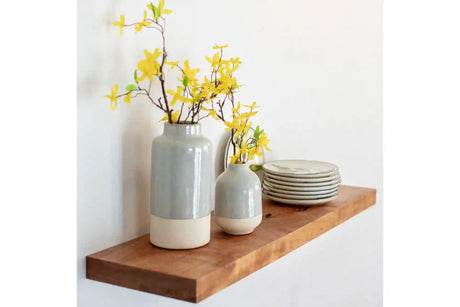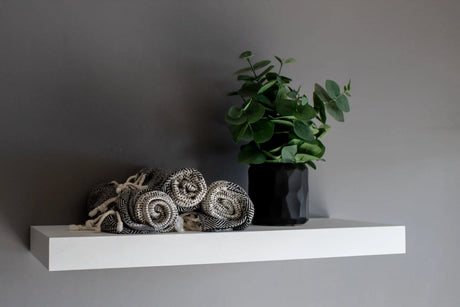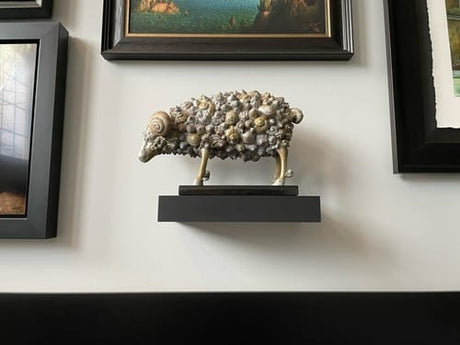

If you've ever tried to make a wall-mounted TV look like it belongs in your living room, you know the problem. The TV goes up, and suddenly the rest of the wall looks empty. Bare drywall on both sides, a tangle of cables underneath, maybe a sad little console table trying its best. Floating shelves fix all of it. They turn a TV wall into something that actually looks finished, and they do it without eating up floor space. Browse shelves for your living room to see all the species and sizing options.
Under the TV: The Most Common Setup
This is where most people start, and for good reason. Shelves below the TV replace the entertainment center entirely. No bulky furniture, no dust-collecting cabinet doors, just clean lines and open storage.
For this setup, I'd recommend one or two shelves. A single long shelf works if you're keeping it minimal (streaming box, a couple of remotes, maybe a small plant to prove you're a functioning adult). Two stacked shelves give you room for books, speakers, game consoles, and whatever else used to live inside that entertainment center you got rid of.
Sizing matters here. You want the shelf at least as wide as the TV, ideally a few inches wider on each side to frame it. A 55" TV is about 48" wide, so a 54" or 60" shelf looks proportional. If you're working with a larger screen, look at wide floating shelves in the 60" to 72" range.
Depth depends on what's going on the shelf. A streaming box and some decor? 8" is fine. Game consoles, receivers, or a soundbar? Go 10". Check the depth guide for a full breakdown by use case.
Around the TV: Shelves on Both Sides
This is where things get interesting. Flanking the TV with shelves on either side creates a built-in look without the built-in price tag. It works especially well on wider walls where the TV alone would look lost.
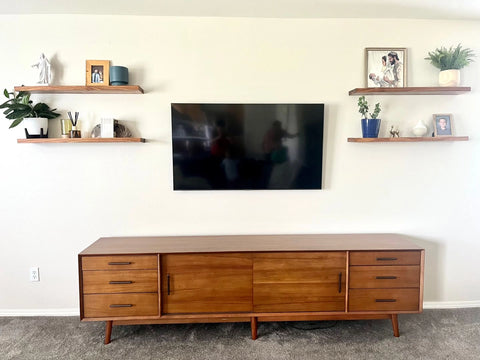
The key is symmetry. Same shelf length on both sides, same height, same spacing. Stagger items on the shelves (tall on one end, short on the other, alternate sides) so it doesn't look like a library. This setup is basically an open-concept entertainment center, and it reads as intentional rather than improvised.
For the shelves themselves, I'd lean toward 24" to 36" long on each side, depending on how much wall you have to work with. Too long and they crowd the TV. Too short and they look like afterthoughts. My spacing guide covers the math on how far apart to set them vertically.
Above the TV: The Finishing Touch
A single shelf above the TV ties the whole wall together. It caps the composition and gives you a spot for frames, small art, or a trailing plant that softens all those hard edges.
Keep it simple up here. One shelf, slightly wider than the TV, mounted 6" to 10" above the top of the screen. This isn't a storage shelf; it's a design element. 8" deep is plenty.
If you're combining above-TV shelves with floating shelves above the sofa on an adjacent wall, keep the mounting height consistent across both walls. Nothing looks more off than shelves at two different heights in the same sightline.

The TV Bedroom Setup
This isn't just a living room play. A wall-mounted TV in the bedroom with a single floating shelf underneath replaces both the TV stand and the dresser surface in one move. Clean, minimal, and you get your floor space back.
For bedroom floating shelves flanking a TV, go shorter (18" to 24") and keep them at nightstand height if they're near the bed. A book, a lamp, a phone charger. That's all you need up there.
Wood Species: What Looks Good Next to a Screen
The TV is a giant black rectangle. Your wood choice either complements that or fights it.
Dark walnut shelves create a warm contrast against light walls and pair naturally with the dark screen. It's the most popular species I build for entertainment center setups, and it's not close.
Floating white oak shelves work well in lighter, more modern spaces. The grain is subtle enough that it doesn't compete with whatever's on screen, and it brightens the wall instead of weighing it down.
Black wall shelves disappear next to the TV in the best way. If you want the shelves to blend into the setup rather than stand out as a design feature, black is the move. White shelves for wall do the opposite: they pop against darker walls and make the whole composition feel lighter.
If you want to see the grain and color in person before committing, order a sample. Screens lie about wood tones.
Add LED Lighting and the Whole Wall Changes

This is the move nobody thinks about until they see it. LED strip lighting routed into the underside of a floating shelf turns your TV wall into something that looks like it costs ten times what it did. Bias lighting behind or below the TV reduces eye strain, and accent lighting on display shelves makes everything on them look intentional.
I route LED channels directly into the wood, so there's no adhesive strip peeling off six months from now. It's a clean, permanent install. Check out floating shelves with lights for details on how the routing works and what it costs.
Weight Capacity: The Number Everyone Gets Wrong
Here's the part where I have to correct something the internet gets wrong constantly. Most floating shelves top out at 20 to 30 lbs. That's fine for a candle and a picture frame. It's not fine for a receiver, a stack of books, a soundbar, and a game console.
Every shelf I build uses the Hovr bracket, which holds 150 lbs per stud. On a 36" shelf hitting two studs, that's 300 lbs of capacity. You could put your TV on it if you wanted to (though I'd still recommend a wall mount for the screen itself). The point is, you never have to think about weight with these shelves. Load them up.
If weight capacity is a deciding factor for your setup, the full breakdown is in my floating shelf weight capacity post. It covers stud placement, bracket types, and why most shelves sag.
For heavy setups (full home theater gear, heavy duty floating bookshelves flanking the TV), I recommend hitting three studs if your wall allows it.
Sizing It Right

A few rules of thumb that'll save you from second-guessing:
Width: Match or slightly exceed the TV width. A shelf narrower than the TV looks like it's hiding behind the screen.
Depth: 8" for decorative, 10" for functional. Don't go 12" unless you're storing something that genuinely needs it; deep shelves under a TV can start to look like countertops.
Spacing between shelves: 10" to 14" between stacked shelves, depending on what's going on them. Tighter for small decor, wider for books or electronics with height.
Custom lengths: If your wall doesn't cooperate with standard sizes, I build custom size floating shelves from 12" to 72" long and 6" to 12" deep. Measure the wall, reach out, and I'll cut to your exact specs.
Ditch the Entertainment Center
The bulky entertainment center had a good run. It held your VHS tapes, your DVD collection, your cable box, and about nine remotes. But streaming killed most of that hardware, and what's left doesn't need a five-foot-wide cabinet to live in.
Floating shelves give you a cleaner look, more floor space, and a setup that actually matches how people use their living rooms now. A couple of strong floating shelves on the wall hold everything a modern entertainment system needs, and they do it without the visual weight of furniture you don't need anymore.
If you're ready to make the switch, start with the wall measurements, pick a wood species, and go from there. I build everything to order and ship nationwide.